There are good reasons to want a Google Business Profile gone. The business may have closed, moved or been sold. You might have found a duplicate profile, or you may simply no longer want to manage it.
Before you press delete, it helps to know what Google actually does when you remove a profile. It is not the same as wiping your business from Google, and in many cases another option works better. This guide explains the steps and the choices.
Deleting Is Not The Same As Disappearing
The most important thing to understand is this: removing a Google Business Profile removes your control over it and the content you added. It does not guarantee the listing disappears.
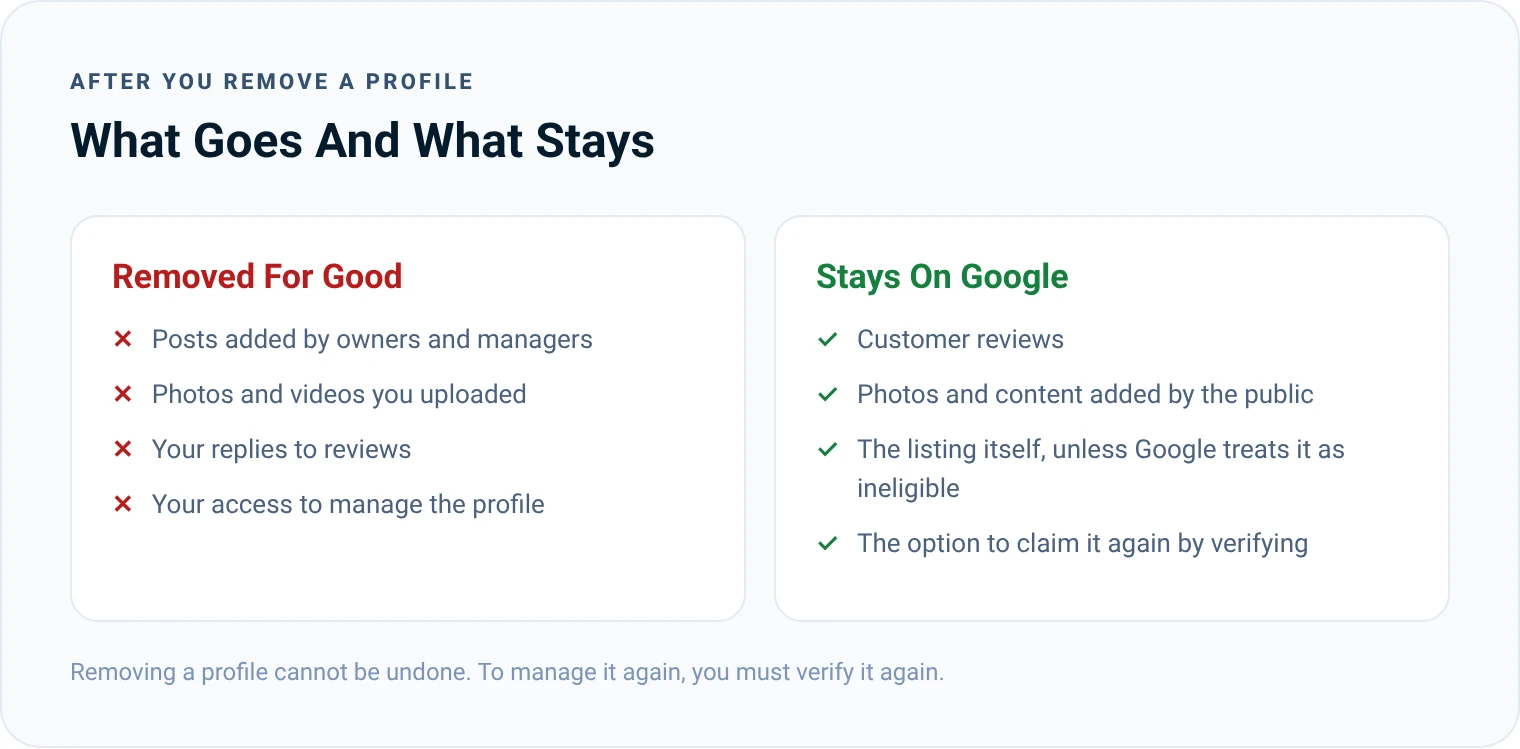
Google's help pages say that after you remove a profile, the business may still appear on Search and Maps, unless Google considers it an ineligible business. Customer reviews stay. Photos and other content added by the public stay. What goes is the content you added and your ability to manage it.
So if your goal is to stop customers turning up at a closed shop, deleting the profile may not achieve it. Marking the business as closed usually does more.
First, Choose The Right Option
Depending on your situation, one of four options will fit best.
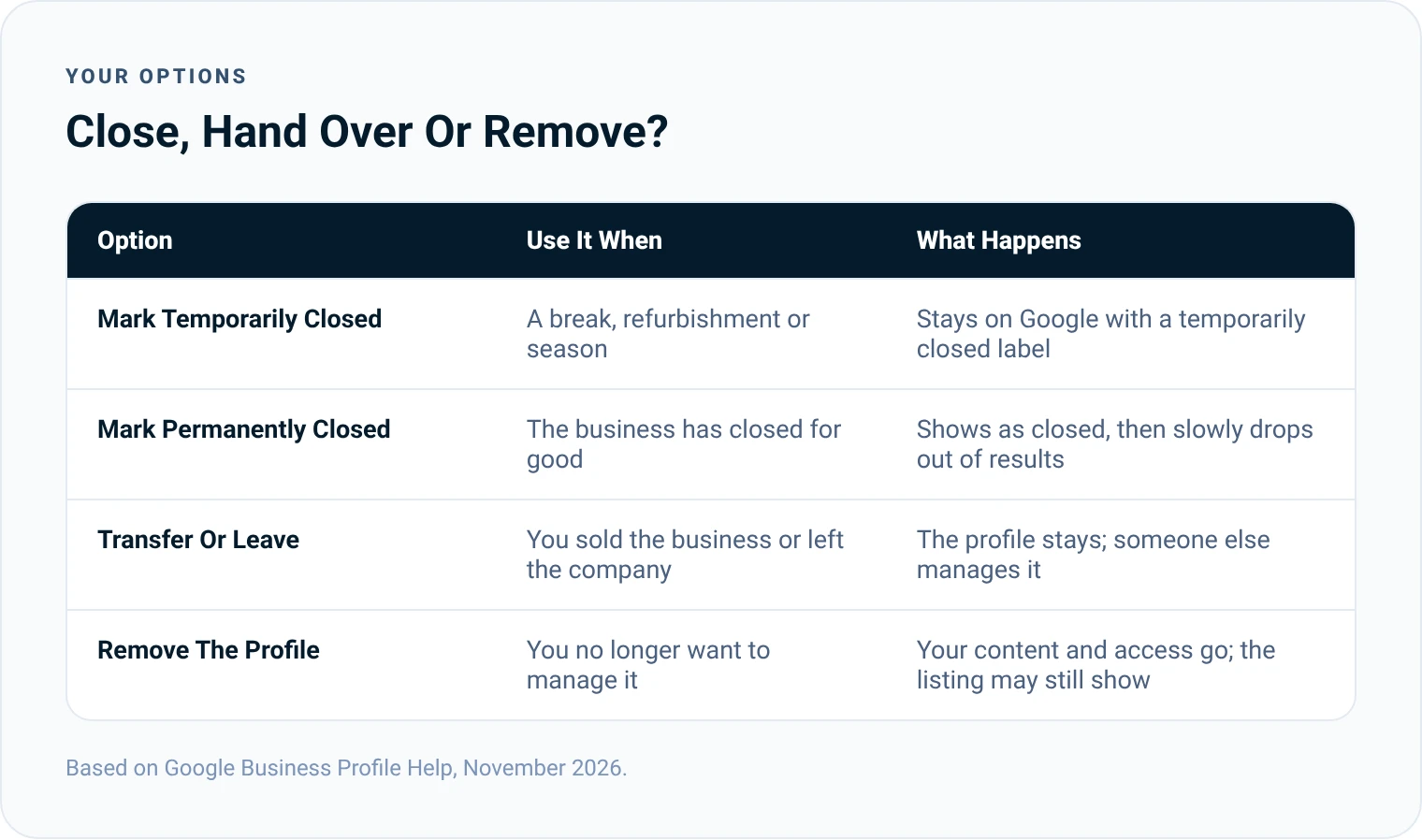
- Mark as temporarily closed. For a refurbishment, a seasonal break or a long holiday. Your profile stays visible with a temporarily closed label, and you keep all your reviews and rankings for when you reopen.
- Mark as permanently closed. For a business that has closed for good. Google says the business will not disappear from Maps straight away. It slowly drops out of search results and is then fully removed.
- Transfer ownership or remove yourself. For a business that has been sold, or when you have left the company. The profile carries on, and the new owner keeps its reviews and history.
- Remove the profile. When you no longer want to manage it at all, or it is a duplicate you created by mistake.
If you have moved, do not delete your profile and start again. Update the address on your existing profile instead, so you keep your reviews.
Who Can Delete A Profile
Only the primary owner can remove a profile's content and managers. Managers cannot do it. If you were recently added as an owner or manager, Google makes you wait 7 days before you can remove the profile content or other managers.
If you are an owner or manager and simply want to step away, you can remove yourself without affecting anyone else. If you are the primary owner and want to leave, transfer primary ownership to someone else first.
How To Delete One Google Business Profile
These are the steps Google gives for a single profile:
- Go to business.google.com and sign in with the Google account linked to the profile.
- Select More, then Business Profile settings.
- Select Remove Business Profile.
- If the business has closed, turn on Mark your business as permanently closed.
- Select Remove profile content and managers, then Continue.
- Select Remove, then Done.
How To Delete Several Profiles At Once
If you manage more than one location:
- Open the Business Profile Manager and sign in with the account that manages all the profiles.
- Select the profiles you want to remove. If the businesses have closed, mark them as permanently closed first.
- At the top right, select Actions, then Remove businesses, then Remove.
If you see an error, Google says you will need to remove the content and managers for each profile one at a time.
Keep your messaging consistent across every channel. When everything matches, search engines and AI tools clearly understand what your company stands for.
 Christopher LierSEO Consultant And Founder Of LinkPanda
What Happens After You Delete It
Once you remove a profile:
- The posts, photos, videos and review replies added by owners and managers are permanently deleted.
- Customer reviews and content added by the public remain.
- You can no longer manage the profile on Search or Maps.
- The business may still appear on Google, unless it is treated as ineligible.
There is no undo. If you change your mind, you will need to verify the profile again to manage it.
Should You Delete And Start Again After A Suspension?
It is tempting to delete a suspended or troubled profile and create a fresh one. In most cases this is a mistake. Google's help pages say not to create a new Business Profile for the same business, and a new profile set up the same way is likely to run into the same problem. You also lose the history and reviews that help you rank.
The better route is to fix the cause and appeal. Our guide on what to do when a Google Business Profile is suspended explains how.
If Your Business Has Moved Or Rebranded
A move or a new name is not a reason to delete your profile. Update your address or business name on the existing profile instead. Google may ask you to verify the profile again, but your reviews and history stay with you.
If you moved to a new area and no longer serve the old one, update your service areas at the same time. If you opened a second location rather than moving, create a separate profile for the new site and keep the original as it is.
How To Remove A Duplicate Profile
Duplicates are common, especially when a business has worked with several agencies over the years. If you can access the duplicate, remove it using the steps above. If you cannot, use the "Suggest an edit" option on the duplicate listing to report it, or contact Google Business Profile support.
Before you remove a duplicate, check which profile has the most reviews and the correct details. Keep that one.
What About A Business You Do Not Own?
You cannot delete a profile you do not manage. If a listing is wrong, for example a business that has closed or never existed, find it on Google Maps, select "Suggest an edit" and choose the option that fits. Google reviews the suggestion before changing anything.

Before You Delete: A Quick Checklist
Removing a profile cannot be undone, so it is worth five minutes to check you are making the right choice. Run through these questions before you start, and if any answer is "no" or "not sure", consider closing or transferring the profile instead.
- Is the business really closed, or just moving or changing hands?
- Would marking it as closed do the job better?
- Do you want to keep the reviews for a future business or new owner?
- Are you the primary owner, and has it been more than 7 days?
- Have you saved any photos you want to keep?
- Have you told your team and any agency that manages the profile?
Need A Second Opinion?
If you are not sure whether to close, transfer or remove a profile, or you are dealing with duplicates across several locations, our local SEO team can review your listings and sort them out. If your aim is to start again with a clean setup, read our guide on how to create a Google Business Profile first.
Christopher Lier
Christopher has worked in SEO since 2015 and is the founder of LinkPanda, the agency behind SMESEO. He helps small and medium-sized businesses get more customers from Google and AI search.
More about Christopher